This is my Discord Bot
I named it Robotnic
Why I Built This Bot
In active Discord communities, voice channels can quickly become cluttered with unused rooms, making navigation confusing and discouraging user engagement. At the same time, static channels offer little flexibility or control to the users actually in them.
I built Robotnic to solve this. The bot dynamically manages voice channels based on real user activity. When a user joins a "channel hub," a temporary voice channel is automatically created for them. When they leave, it disappears. No admin cleanup required. On top of that, users have full control over their temporary voice room, including the ability to hide it, lock it, or manage access.
The goal was to create a clean, user-friendly, and self-moderating voice channel experience. One that empowers users, reduces moderator overhead, and keeps the server tidy and inviting.
Features
- Automatic Channel Creation & Cleanup
Channels are created when needed and automatically deleted when empty, reducing channel bloat and keeping the server clean. - User-Controlled Permissions
Users can lock their temporary channels, hide them from others, or create personalised access lists (whitelist/blacklist), all from a persistent control panel. - Persistent Interface
Each channel has an associated text panel with buttons and live information, helping users understand and manage their voice channel with ease. No commands needed. - Crash-Resistant State Management
Channel data is saved to a local database (SQLite), ensuring the bot can recover and clean up correctly even after restarts or crashes. - Built for Real Use
The bot was designed to run 24/7, respond to rapid user activity, and operate reliably even in high-turnover environments with multiple overlapping events.
Impact
Since launch, Dr Robotnic has been installed in over 250 Discord servers, serving over 85 thousand users across a wide range of communities. This bot has solved real problems for real people: over a dozen server admins and users have personally joined the support server to offer feedback and thanks. Many now rely on it daily to reduce moderation load and enhance the user experience.
The project is self-hosted, free, and open-source. By making the codebase public and continuously improving it, I've allowed others to learn from, modify, or contribute to the project, while I maintain reliable uptime and handle all server costs myself.
Challenges In Detail
Storing Information
Aim
When a user joins a specific, pre-determined voice channel (channel hub), I want to create a new voice channel (temporary voice channel) and move them into it. When the user leaves that channel, the temporary voice channel should be deleted.
Initial Plan
Originally, I was planning to only store the channel hubs' IDs and keep the temporary voice channels' IDs in a list in memory. However, this approach had a major flaw. If the bot restarted or crashed, it would stop tracking any existing temporary voice channels. This meant admins would have to manually delete any leftover temporary channels.
Improved Solution
To fix this issue, I redesigned the system to use persistent storage so the bot could recover its state after restarts or crashes. The only question was: which type of database? This led me to lightly research different types of databases. For my use case, I ended up choosing SQLite, as it's a simple and lightweight solution that works well. Since it's stored in a file, I could view and query the database easily through my IDE, which aided my learning.
Refactoring for Maintainability
As the project grew, manually managing the database queries became messy and hard to track. To improve modularity, I implemented a database abstraction layer to decouple persistence logic from business logic, improving maintainability and extensibility.
As new functionality was implemented, the database schema had to be considered. New features often required new columns in the database which may not exist in older instances. To solve this, I implemented automatic schema migration to ensure forward compatibility without manual database intervention. This was done by storing new columns in a dictionary which checks for their existence and adds them with default data if missing
Results
The bot now consistently handles temporary voice channels without leaving any orphaned ones behind, even after restarts or crashes. SQLite proved to be reliable and low-maintenance, and the abstraction layer made the overall codebase more maintainable. Users were moved seamlessly between channels, and admins no longer had to worry about manual cleanups.
What I Learned
I learned that even small-scale features can benefit from persistent storage and a bit of foresight into failure cases. I also gained a much deeper understanding of working with SQLite in a real project and how to abstract logic in a way that improves maintainability. Most importantly, I saw the value of planning for edge cases, especially in bots that are expected to run 24/7.
- Persistent state management
- Schema migration strategies
- Abstraction layers
- Separation of concerns
- Fault tolerance
- Data integrity
Handling Concurrency
The Problem
One tricky issue I faced was dealing with users rapidly joining and leaving the channel hub, especially in quick succession. Since the bot responds to voice state updates, multiple overlapping events could trigger simultaneously, leading to race conditions. For example, the bot might try to create a new temporary channel while also trying to delete it, or it might attempt to move a user to a channel that no longer exists.
The Solution
To prevent this, I implemented checks to verify the current voice state before taking any action. I implemented per-user synchronisation logic to prevent concurrent channel creation or deletion operations. Where necessary, I utilised defensive programming to ensure safe handling of inconsistent or stale states.
Outcome
These changes made the bot much more stable and resilient under real-world use, especially in servers where users frequently join and leave voice channels quickly. It also helped prevent ghost channels or unexpected errors due to overlapping events.
What I Learned
- Asynchronous systems
- Event-driven architecture
- Concurrency risks
- Reliable engineering
Displaying Information to Users
The Problem
In previous projects, I implemented many commands that displayed information to users. However, this approach often left users uncertain about their permissions and capabilities within their voice channels, as well as unsure how to use the bot effectively.
The Solution
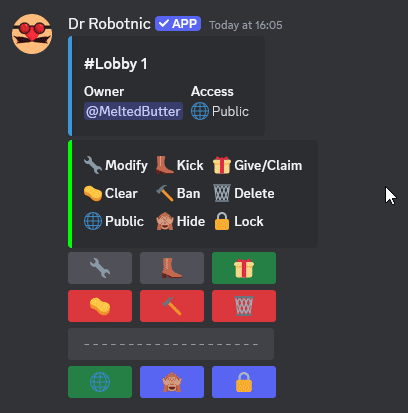
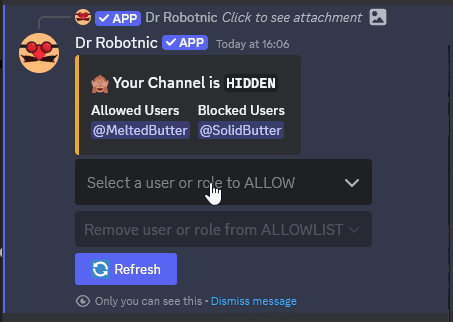
To address this, I created a persistent message in each channel's associated text channel. This message provided real-time system state visibility and direct user control over channel configuration. This approach provided users with immediate, clear feedback on what actions they could take and how to control their channels. This worked well for basic management and was a more dynamic and intuitive for advanced control like locking or hiding channels, as well as managing a whitelist and blacklist for specific users or roles from accessing the user's channel.
Results
The result was a clear, user-friendly interface that gave channel owners greater control over who can view or use their temporary voice channels. This improved user experience and reduced confusion by making permissions and channel status instantly visible and easily adjustable.
What I Learned
The method used to communicate functionality to users was a key aspect of this project. By creating a persistent control interface using interactive components in the associated text channel, I was able to provide users with immediate feedback on what actions they could take and how to control their channels. This approach not only improved the user experience but also provided a more dynamic and intuitive way to manage multiple features with complex interactions.
- Frontend/backend interaction
- State synchronization
- User-driven system control
- UI design for complex systems
Tech & Skills Used
- Python, discord.py and pycord
Designed and implemented an event-driven system handling voice state updates, channel lifecycle management, and Discord API integration. - SQLite
Implemented persistent data storage to maintain system state across crashes and restarts, including automatic schema updates and forward-compatible migrations. - Database Architecture
Created a database abstraction layer to separate persistence logic from business logic, improving maintainability, extensibility, and code clarity. - Asynchronous Programming
Managed concurrent Discord events safely, implementing synchronization logic to prevent race conditions and ensure consistent system state. - Fault-Tolerant System Design
Built recovery-safe logic to prevent orphaned channels and ensure reliable operation during rapid user interactions, disconnects, and restarts. - Event-Driven Architecture
Structured the bot around Discord's real-time event system, enabling scalable and responsive handling of channel creation, deletion, and user interaction. - Interactive UI Systems
Developed persistent control panels using interactive components, allowing users to dynamically configure channel permissions and settings. - Linux Deployment & Systemd
Deployed and managed the bot as a system service on a self-hosted Linux server, ensuring automatic startup and crash recovery. Later migrated to enterprise hosting solution to mitigate residential network and power outages. - Version Control & Open Source Practices
Used Git and GitHub for version control, structured commits, documentation, and iterative feature development. - Production Debugging & Reliability
Diagnosed and resolved real-world issues including race conditions, stale state, and edge cases arising from asynchronous event timing.